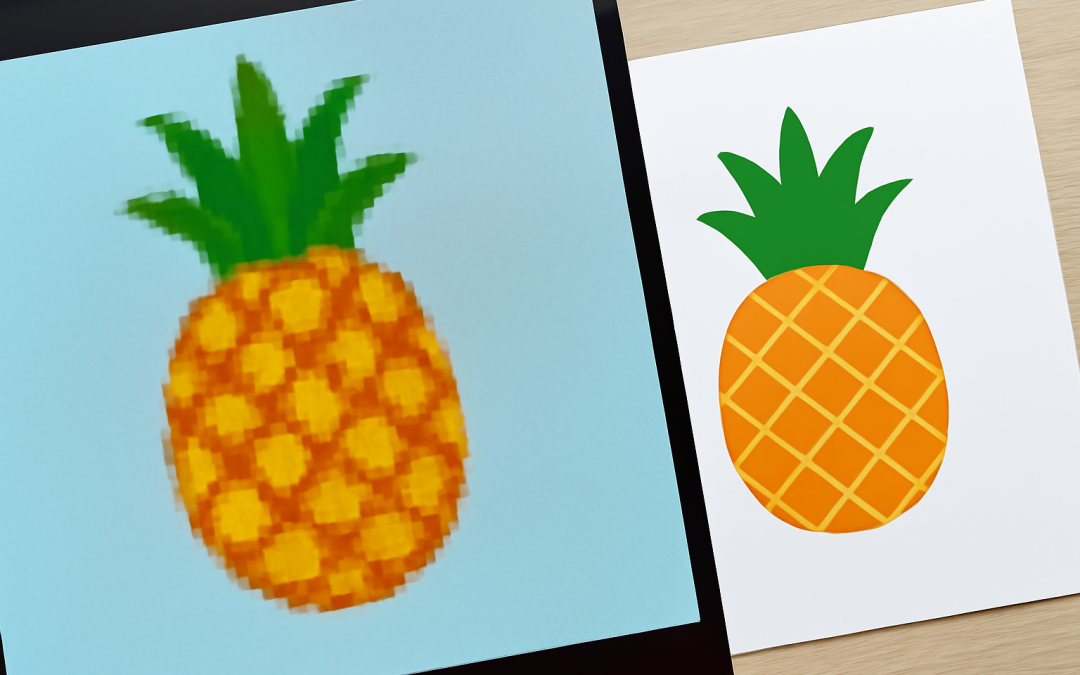
In the world of digital design, understanding the fundamental differences between raster and vector graphics is essential for producing high-quality and effective visual content. These two distinct types of graphic formats serve different purposes and are suited to various projects depending on factors like scalability, file size, and resolution. By grasping their unique characteristics, designers, illustrators, and content creators can make informed decisions about which format to use, ensuring their work maintains clarity and detail across a variety of applications.
Raster graphics, also known as bitmap images, are composed of tiny square pixels, each containing individual color information. These images are essentially grids of colored dots that, when viewed together, form a complete picture. Common raster formats include JPEG, PNG, GIF, and BMP files. Since raster images store color data pixel by pixel, they are excellent for displaying complex images with subtle shading and color gradients, such as photographs and detailed artwork. Because of their pixel-based nature, however, raster images are resolution-dependent, meaning their quality diminishes when scaling up beyond their original dimensions, often resulting in pixelation and loss of detail.
Vector graphics, on the other hand, use mathematical formulas and geometric primitives such as points, lines, curves, and shapes to construct images. Instead of storing data for each pixel, vector files define images by specifying how these shapes relate to one another and what colors fill them. Formats such as SVG, AI, and EPS rely on vector principles. Due to their mathematical foundation, vector graphics can be scaled to any size without losing quality, making them ideal for logos, icons, typography, and other designs where crisp, clean lines are necessary regardless of the output size. Additionally, vector files often have smaller sizes compared to large raster files, since they only need to store a set of instructions rather than extensive pixel information.
The choice between raster and vector graphics largely depends on the intended use of the image. Photographs, for example, are best represented as raster images because of the infinite array of colors and subtle shifts in tone they contain. Attempting to convert a photograph into a vector format would result in a heavily stylized and less accurate depiction. Conversely, logos and branding materials require the flexibility offered by vector graphics, enabling consistent reproduction across a wide range of media, from business cards to billboards, while maintaining precise edges and proportions.
Another important consideration is editing flexibility. Raster graphics editing is typically more intuitive when working with detailed images and photographs, as pixel manipulation makes retouching, color correction, and adding effects straightforward. Software like Adobe Photoshop is tailored for raster editing, with tools designed to work on pixels individually or in groups. Vector graphics editing, often performed in programs like Adobe Illustrator or CorelDRAW, involves manipulating control points, paths, and curves, which allows for precise adjustments but can require a steeper learning curve. While vector graphics excel in creating sharp, clean illustrations, they can be limiting when attempting to render photo-realistic images.
When discussing print and digital media, the distinction between raster and vector graphics becomes even more critical. Printers require images of sufficiently high resolution to avoid blurriness or pixelation. Raster images intended for print must be created or saved at the correct resolution, generally 300 dots per inch (DPI) or higher. If an image is scaled beyond its native resolution, print quality will suffer. Vector graphics eliminate this constraint entirely because their scalability is inherent, making them the go-to choice for print materials that need to be resized or repurposed frequently, such as brochures, posters, and packaging designs.
On the web, raster graphics dominate because screens display images as pixels. Therefore, the quality of raster images is tied to the display resolution of the device. Pages with many raster images, especially high-resolution ones, can load slowly and consume large amounts of bandwidth. Vector graphics are increasingly popular in web design due to their scalability and small file size; SVG images, in particular, support interactivity and animation, which raster formats cannot inherently provide. As a result, for logos and interface icons on websites and applications that require responsiveness and fast loading times, vector graphics are usually preferred.
File size management is another distinguishing factor. Raster images, with their pixel-specific data, can rapidly grow in size as image dimensions increase or when multiple color channels (such as in CMYK printing) are involved. Compressing raster images often reduces file size but can degrade image quality, especially with lossy compression formats like JPEG. Vector graphics typically maintain smaller file sizes because they store mathematical data rather than pixel data. This difference can be crucial when working under storage limitations or preparing images for online use where download speed affects user experience.
Color representation works differently between these two graphic types. Raster images support millions of colors in rich detail, which enables photo-realistic variation and delicate gradients. Vector graphics generally use flat colors or gradients created mathematically, which work exceptionally well for graphic designs needing solid fills, sharp outlines, or minimalistic styles. While vector files can simulate gradients and shading, their ability to replicate highly intricate color variations found in photographs is limited compared to raster images.
Understanding how transparency is handled further clarifies their respective usages. Raster formats like PNG support transparency by allowing individual pixels to have varying degrees of opacity, enabling smooth, soft edges or semi-transparent effects. GIFs support transparency as well but only in a limited capacity, usually with a binary transparent or opaque state. Vector graphics allow for transparency as part of their fill and stroke properties, which can be consistently applied regardless of size. However, complex transparency effects often look more natural in raster images due to the pixel-level control over opacity.
In terms of software compatibility, raster and vector graphics engine operate differently. Most image-editing software supports raster graphics by default, but vector software might require additional skills or tools. Many programs today offer hybrid environments that integrate both raster and vector editing capabilities, reflecting users’ needs to work with both types in the same project. For instance, digital artists might use vector shapes for initial layouts and switch to raster layers for detailed painting and texture work.
File interoperability is another critical topic. Raster graphics can be converted into vector graphics through techniques like image tracing or vectorization, but the outcome depends heavily on the complexity and quality of the initial raster file. Highly complex images with many colors and fine details can lead to vector files with thousands of points, making them difficult to edit. Conversely, vector graphics can be easily rasterized to produce pixel-based images for uses where raster is necessary, such as digital photography or web graphics that do not support vector formats.
Each format also influences design workflow and printing processes. Whereas raster graphics editing allows for intricate retouching and photo manipulation work ideal for images destined for magazines or websites, vector graphics enable precision design and layout adjustments critical for logos, fonts, and printed elements that require scalability and clean reproduction. The printing industry often demands raster images for photos but vector graphics for line art to guarantee crisp production.
Historically, technological limitations shaped the distinction between raster and vector graphics. Early computer displays and printers were designed around raster technology, and vector graphics hardware was less common. Today, advances in computing power and software have blurred the lines, allowing users to seamlessly combine both formats based on project needs, expanding creative possibilities.
In summary, the decision between raster and vector graphics is deeply influenced by the nature of the project, desired image quality, scaling requirements, and workflow preferences. Raster graphics provide unparalleled detail and color depth ideal for photographic images but come with scaling limitations. Vector graphics offer scalability, smaller file sizes, and sharp illustration quality but are less suited for complex, color-rich images like photographs. Mastery of these graphic types equips designers with the tools to optimize their creative output effectively. Recognizing their strengths and limitations ensures that the final work is both visually impressive and technically sound, whether displayed on a digital screen or printed at large scale.